
How to use Media Collections
What Media Collections are for
Media Collections in Broadcast let you group related screen content together so it is easier to organise and reuse. A collection can contain multiple media items, making it useful for campaigns built around selected products, seasonal ranges, or promoted lines.
In the app, you create these groups from the Create Media Collection screen, then connect them to individual media items using the Media Collections field on the Add Media screen.
Create a Media Collection
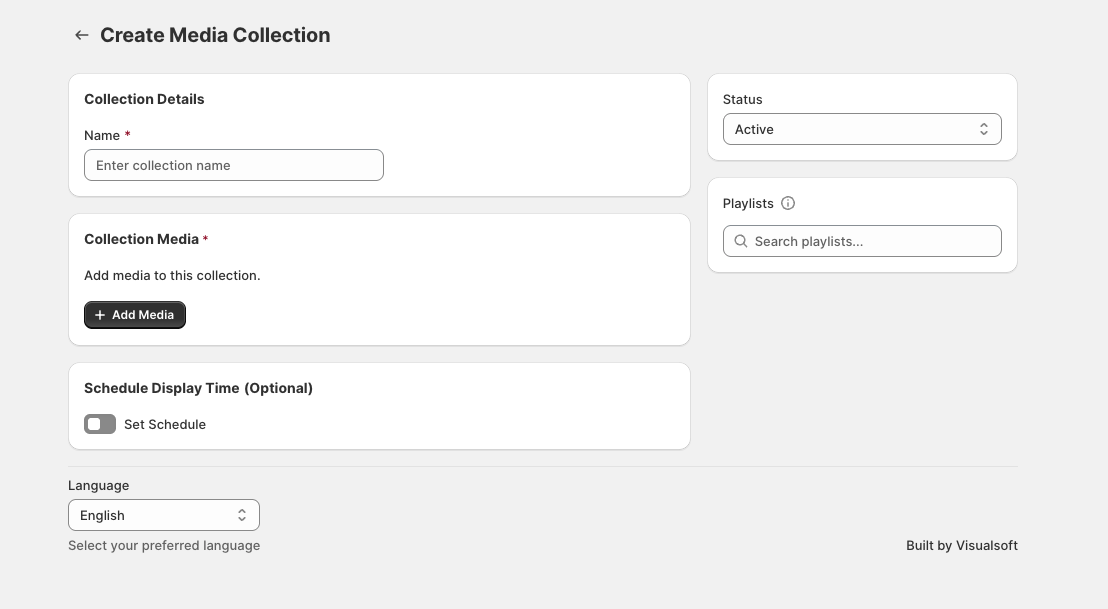
Go to the Media Collections area in Broadcast and open Create Media Collection.
In Collection Details, enter a name in Name. Choose the collection Status, such as Active, if you want it available for use.
In Collection Media, select + Add Media to add the items you want included in the collection.
You can use this to build a collection around a promotion, a season, or a hand-picked product group.
If needed, use Playlists to find relevant playlists and Schedule Display Time (Optional) to turn on Set Schedule for date-based campaigns.
Attach a collection to a media item
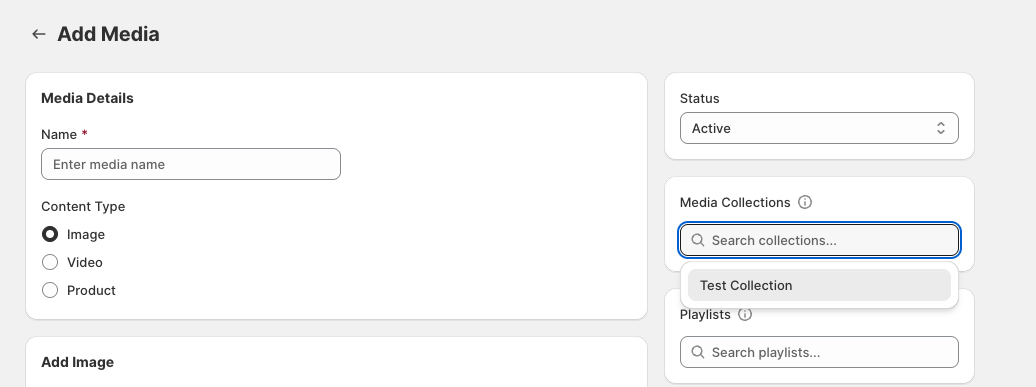
After creating a collection, open Media and choose Add Media or edit an existing item.
On the Add Media screen, use the Media Collections field to search for and select the collection you want to attach. The dropdown shows matching collection names as you type.
This links the media item to that collection, helping you keep campaign content organised and easier to surface in the right screen setup.
When to use Media Collections
- Seasonal campaigns such as summer, Christmas, or back-to-school content
- Promoted products you want to market across linked screens
- Selected ranges where several items should be grouped under one campaign theme
- Reusable content sets that may be attached to multiple media entries over time
How this helps on screens
Media Collections give you a simple way to organise display content before it is used in your wider Broadcast setup. Instead of treating every media item as separate, you can build grouped campaign content that is easier to manage and apply across your screen marketing.